If you sell on Amazon, your product listings are about to undergo their biggest structural shakeup in years.
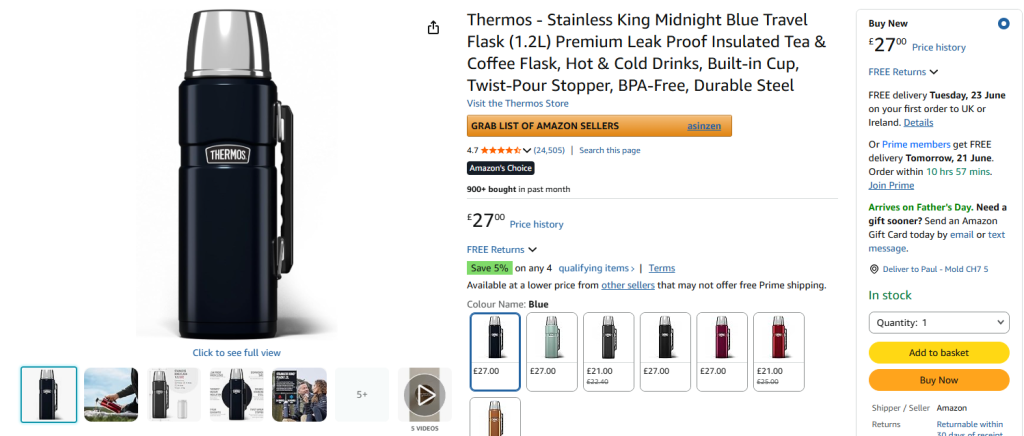
Starting July 27, 2026, Amazon will strictly enforce a 75-character limit for product titles across almost all non-media categories. If your titles exceed this length, Amazon’s AI will automatically step in and rewrite them for you.
This isn’t just a minor formatting rule; it fundamentally changes how Amazon SEO, indexation, and mobile conversions work. Here is everything you need to know to protect your organic traffic and take control of your listings before the deadline.
What is Changing on Amazon on July 27?
Amazon is moving away from long, keyword-stuffed product titles. The update splits your traditional 200-character title real estate into two distinct, structured data fields:
- The Product Title: Max 75 characters (including spaces). This must focus purely on core brand identity and the primary product name.
- Item Highlights: A new, secondary field offering 125 characters of searchable text. This is dedicated to supplementary details like materials, dimensions, compliance data, and recommended use cases.
Note: The media category (Books, Music, Video, DVD) is the only major exception exempt from this 75-character cap.
Why is Amazon Restricting Title Lengths?
The primary driver behind this update is mobile shopping optimization.
Long product titles truncate drastically on mobile screens, creating a cluttered, inconsistent, and frustrating user experience. By forcing a 75-character limit, Amazon ensures that a product’s full name displays cleanly on smartphones.
Furthermore, as Amazon shifts toward conversational, AI-driven search shopping, clean and structured data helps the algorithm understand exactly what a product is without weeding through keyword stuffing.
The Ultimate Compliance Checklist for Sellers
To avoid having Amazon’s automated system rewrite your titles, you must audit your catalog and update your listings manually. Use this checklist to stay compliant:
- Audit Your Catalog: Pull your inventory reports and isolate every ASIN with a title longer than 75 characters. Prioritize your top-selling SKUs first.
- Enforce Strict Word Hierarchy: Structure your 75 characters cleanly:
[Brand Name] + [Product Type/Core Keyword] + [Key Spec/Model]. - Trim the Keyword Stuffing: Remove repetitive synonyms, subjective commentary (e.g., “Best Seller,” “Top Quality”), and promotional claims (e.g., “Free Shipping”).
- Migrate Data to Item Highlights: Move technical specifications, materials, and secondary search terms into the new 125-character Item Highlights section. Format these as comma-separated phrases rather than full sentences.
- Use Numeric Shortcuts: Save valuable character spaces by using numerals instead of spelling numbers out (e.g., “2” instead of “Two”) and using standard abbreviations (e.g., “in.”, “cm”, “lbs”).
What Happens if You Do Nothing?
If you choose not to update your listings by July 27, Amazon will gradually roll out its own AI-generated title recommendations across non-compliant products.
While your listings will remain active, allowing an automated bot to truncate your title introduces significant risk. The AI could inadvertently strip out a critical distinguishing feature—such as a specific dosage, compatibility note, or material—that directly drives a buyer’s decision to click.
For Brand Registered sellers, Amazon provides a 14-day review window within the “Review Listing Changes” dashboard. You can monitor, modify, or reject the AI’s suggested title and highlights during this period. However, if you miss the window, Amazon’s automated version goes live on your product page by default.
FAQ: Amazon’s 75-Character Title Policy
Will shortening my title hurt my Amazon SEO keyword ranking?
No, provided you migrate your secondary keywords correctly. Because the new 125-character Item Highlights field is fully indexable and searchable, your total searchable character pool remains roughly the same (~200 characters). You are simply rearranging the data, not losing indexation power.
How do I access Amazon’s AI title tool?
You can preview Amazon’s automated recommendations today. Go to your Manage All Inventory dashboard, click Edit on a listing, and select View Enhancements on the left menu pane to view the system’s suggested 75-character title and matching Item Highlights.
Does this apply to variation listings?
Yes. Amazon guidelines state that parent ASIN titles should remain clean and broad, while specific child attributes (like color, size, or pack count) should be kept brief and cleanly appended within the child ASIN data so it displays correctly when added to a customer’s cart.
Over to You
With the July 27 deadline fast approaching, marketplace teams face an immediate choice: take the time to strategically engineer your new titles by hand, or let Amazon’s automated AI pull the trigger for you.